
When your garage door opener stops working, it can feel frustrating fast. You press the remote, but nothing happens. Either the keypad does not respond, or the wall button works, but the remote will not. In many cases, a simple reset garage opener process can help you reconnect the remote, keypad, or smart app without replacing the whole opener. The key is knowing which reset you need, because a power reset, remote reset, keypad reset, and factory reset are not the same thing.
Reset Garage Opener: Start With a Basic Power Reset
A basic power reset is the safest first step. It does not erase your remotes, keypad, or car buttons. It simply clears small glitches in the opener.
Follow these steps:
- Make sure the garage door is fully closed.
- Unplug the opener from the ceiling outlet.
- Wait 30 to 60 seconds.
- Plug the opener back in.
- Press the wall button.
- Test the remote.
- Let the door complete one full open and close cycle.
If the opener works again, the issue may have been a small electrical glitch. On the other hand, if the remote still does not work, move to the next step and reprogram it.
Reset Garage Opener Remote With the Learn Button
Most garage door openers use a Learn button to connect remotes. The Learn button is usually on the motor unit near the antenna wire. It may be yellow, purple, red, orange, green, or black, depending on the brand and model.
To reset or reprogram the remote:
- Stand on a safe ladder and find the Learn button.
- Press and release the Learn button once.
- A small light should turn on or blink.
- Within 30 seconds, press the button on your remote.
- Hold it for a few seconds.
- Wait for the opener light to blink or click.
- Test the remote from inside the garage.
Once the remote works, you are done. If it still does not respond, replace the remote battery and try again. Also, make sure the remote matches your opener model.
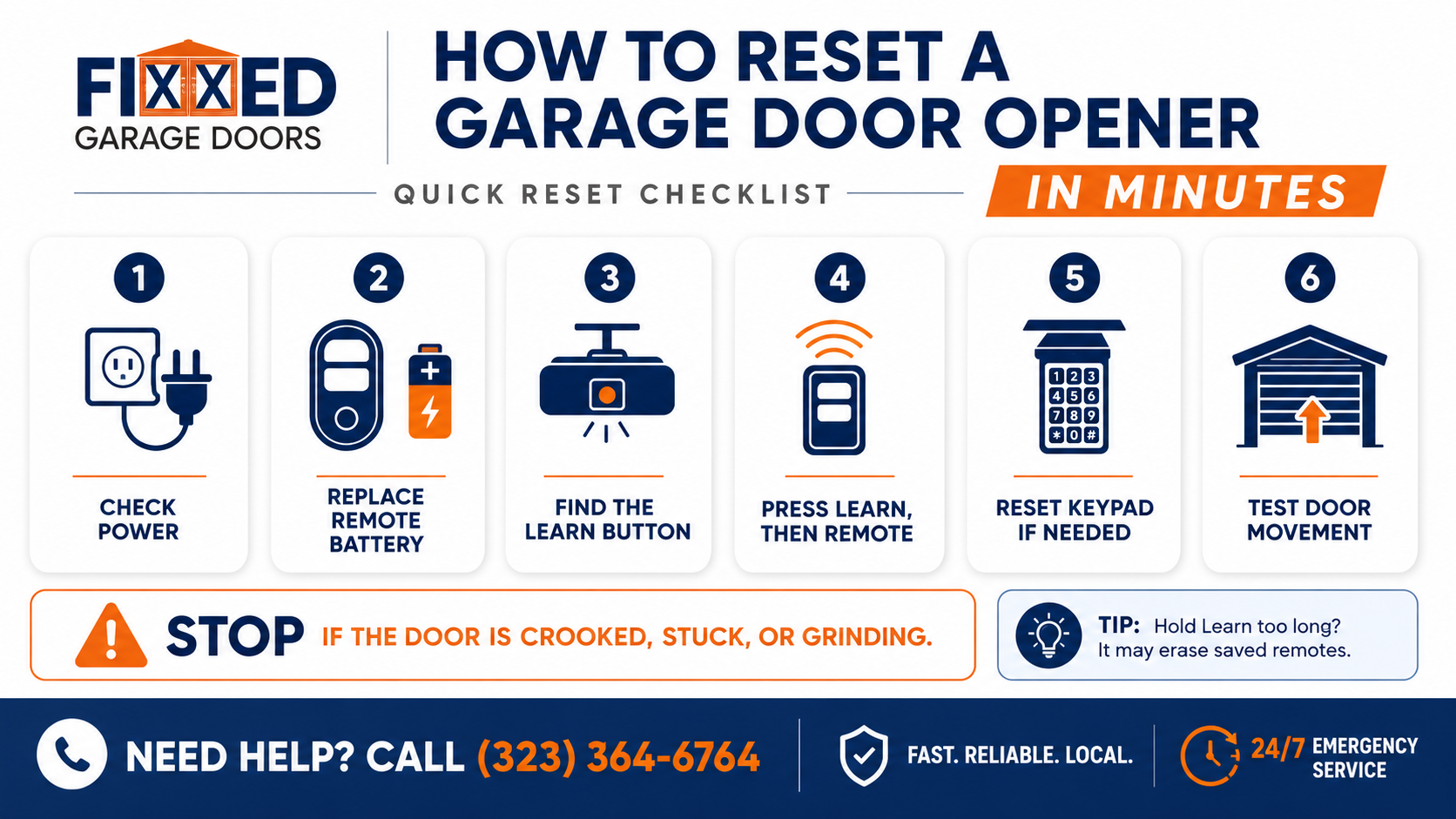
Reset Garage Opener Keypad Code
If your outside keypad stopped working, it may need a new code. This often happens after battery changes, power outages, or opener memory issues.
Here is the common keypad reset process:
- Press the Learn button on the opener motor.
- Go to the keypad within 30 seconds.
- Enter your new 4-digit code.
- Press and hold the Enter button.
- Wait for the opener light to blink.
- Test the keypad by closing and opening the door.
Some keypads have a Program button. Hold it until the keypad light blinks, then enter a new code. If that does not work, check the model number on the keypad and follow the manufacturer’s steps.
Reset Garage Opener for LiftMaster, Chamberlain, and Genie
Different brands use similar reset steps, but the button timing can change. Do not hold the Learn button unless you want to erase all saved remotes and keypads.
For LiftMaster openers:
- Tap and release the Learn button.
- Press the remote button within 30 seconds.
- Wait for the opener light to blink.
For Chamberlain openers:
- Tap the Learn button once.
- Then press the remote button.
- Test the remote after the light flashes.
For Genie openers:
- Hold the Program or Learn button until the light turns on.
- Press the remote button.
- Push it again if the opener requires confirmation.
Older models may use dip switches instead of a Learn button. If your remote has tiny switches inside, match the switch pattern to the opener or receiver.
Reset Garage Opener Memory Only When Needed
A full memory reset erases all remotes, keypads, and car buttons connected to the opener. This can help if you lost a remote or moved into a new home. But it also means you must reprogram every device.
To clear opener memory on many models:
- Press and hold the Learn button.
- Keep holding it for about 6 to 10 seconds.
- Wait for the LED light to turn off.
- Release the button.
- Reprogram each remote, keypad, and vehicle button.
Use this step only if needed. A full garage door opener reset is helpful for security, but it can be annoying if you do it by accident.
Reset Garage Opener Smart App Connection
Smart openers can lose Wi-Fi connection after router changes, app updates, power outages, or password changes. If your garage door works from the wall button but not the app, reset the app connection.
Try this:
- Open the manufacturer’s app.
- Check if the opener shows offline.
- Restart your phone.
- Restart your Wi-Fi router.
- Unplug the opener for 30 seconds.
- Plug it back in.
- Follow the app setup steps again.
- Reconnect the opener to your Wi-Fi network.
Make sure your phone is connected to the same Wi-Fi network during setup. Many smart openers in Valley Village work best with a 2.4 GHz Wi-Fi signal.
Common Garage Opener Reset Situations
The table below highlights a few common situations homeowners encounter and the type of reset that is usually most helpful. This can help you decide where to start before moving on to more advanced troubleshooting.
| Situation | Recommended Reset | Typical Time |
|---|---|---|
| Remote stopped working | Reprogram remote with Learn button | 5 minutes |
| Keypad will not open door | Reset keypad code | 5–10 minutes |
| Smart app shows opener offline | Reconnect Wi-Fi and reset app connection | 10 minutes |
| Opener acts unresponsive after outage | Basic power reset | 1 minute |
When a Reset Will Not Fix the Problem
A reset helps with connection and control issues. It does not fix broken garage door parts.
Do not keep trying to reset garage opener systems if:
- Your garage door is crooked.
- The garage door is stuck halfway.
- The opener rail bends.
- Garage door spring is broken.
- A cable is loose.
- The door is off track.
- Your garage door motor hums but the door will not move.
These signs point to a mechanical problem. If you keep pressing the opener button, you may damage the motor or make the door unsafe. Contact a reliable expert in Valley Village for garage door opener repair.
FAQs About Garage Door Opener Reset
How do I know if my opener has a Learn button?
Look on the back or side of the motor unit. The Learn button is often near the antenna wire. It may be colored yellow, purple, red, orange, green, or black. Some openers hide it behind a light cover.
Why did my remote stop working after I changed the battery?
The remote may have lost its connection to the opener. It may also have the wrong battery type, weak battery contact, or a damaged button. Try reprogramming it with the Learn button.
Can I reset my garage opener without a remote?
Yes. You can use the wall button, keypad, smart app, or opener motor controls, depending on the model. If you need to add a new remote, use the Learn button on the opener.
Will resetting the opener erase my keypad code?
A basic power reset will not erase the keypad. A full memory reset usually will. If you hold the Learn button too long, you may erase all remotes, keypads, and vehicle buttons.
Why does my garage door opener click but not open?
Clicking may mean the opener is receiving power but cannot move the door. The issue may be a gear, motor, spring, trolley, or door balance problem. Stop testing if the door does not move.
Conclusion
A reset can be helpful when your garage door opener loses connection to the remote, keypad, wall control, or smart app. Start with the simple steps first. Try a power reset, replace remote batteries, reprogram the remote, and reset the keypad if needed.
Still, not every opener problem needs a reset. If the door is stuck, crooked, heavy, or making loud noises, the opener may not be the real problem. In that case, forcing the system can cause more damage.
Call Fixxed Garage Doors for a Free Estimate
Need help with a garage door opener reset, remote programming, keypad setup, or opener troubleshooting? Call Fixxed Garage Doors at (323) 364-6764 today and ask for a Free Estimate. Our team can check your opener, test the full garage door system, and help get your door working safely again.

Recent Comments